Projects
Three experiments in agent-native infrastructure — small pieces of glue that let my AI assistants talk to each other, and render into a real browser tab, instead of trapping everything in chat windows.
chatgpt-natasha-bridge
I have two AI assistants I talk to constantly. ChatGPT is where I brainstorm, research, and think out loud. Natasha is my personal assistant on OpenClaw — she has my finances, my calendar, my health records, my house context. Until this project the only bridge between them was me: copy from one window, paste into the other, retype the question, repeat. That's slow and lossy.
The goal was a secure, low-friction channel so ChatGPT can hand a task or question directly to Natasha, and Natasha's answer lands in a place I already read (my Telegram). No sharing of accounts. No exposed secrets. No copy-paste.
Architecture
Five moving parts, each doing one thing:
- ChatGPT Custom GPT — a private GPT called Natasha Relay. Its only tool is a single OpenAPI Action,
sendToNatasha, protected by a Bearer token. - ngrok tunnel — gives the bridge a stable public HTTPS URL (
*.ngrok-free.dev) so ChatGPT's server can reach the box behind NAT. - FastAPI service (bridge.py) — a ~70-line Python service. Validates the Bearer token, accepts
POST /send {"text": "..."}, prepends the[via ChatGPT]marker, and hands off to Telethon. - Telethon (MTProto user client) — signs in as me on Telegram using a saved session string, DMs the marked message to my Natasha bot.
- Natasha on OpenClaw — reads the DM like any other Telegram message. The
[via ChatGPT]prefix tells her the request originated from the other agent, not from me directly.
Security model
- Bearer authentication — every request needs a 43-character random API key. Anyone hitting the public URL without it gets
401. - Encrypted transport — HTTPS end to end (ChatGPT → ngrok → localhost).
- No shared credentials — ChatGPT never sees my Telegram password, my 2FA, or my session token. It only holds the Bearer key for the bridge.
- Marker prefix — every relayed message is prefixed
[via ChatGPT]so Natasha (and I) always know when a request came through the bridge instead of directly from me. Detectable provenance. - Least privilege — the bridge only knows how to send. It can't read my chats, my files, or run commands. If the key leaks, the worst case is spam into a single bot's DM channel.
- Session string, not password — Telethon logs in once interactively with a phone code + 2FA, then persists a session string. The 2FA password is deleted from disk afterward. If the session string is ever exposed I can revoke it from Telegram → Settings → Devices.
Stack
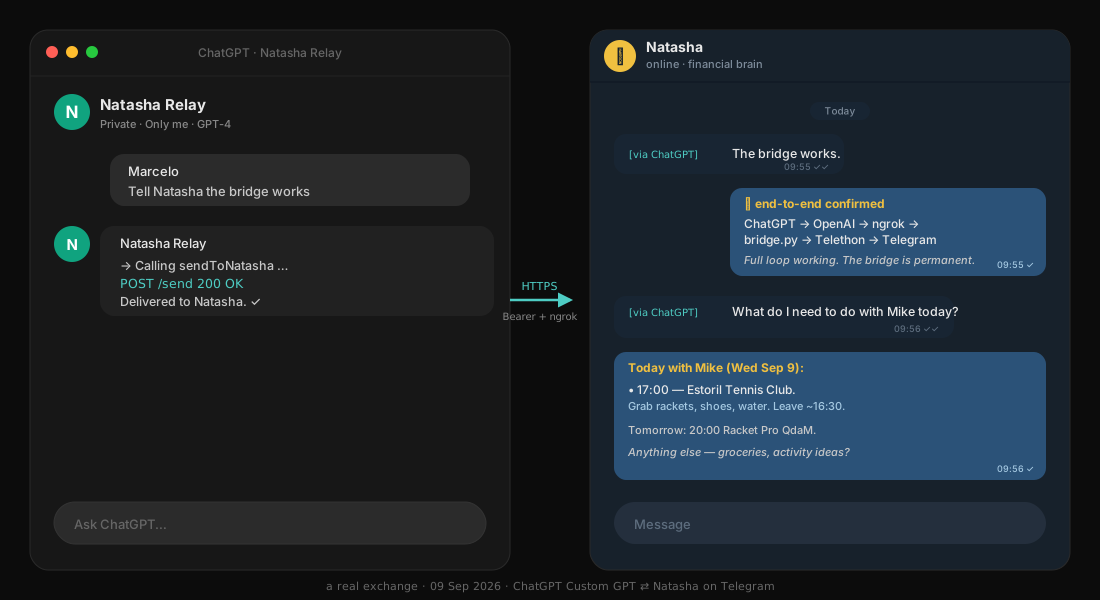
The exchange, end to end
1.  Me → ChatGPT (Natasha Relay GPT):
    "Tell Natasha the bridge works"

2.  ChatGPT → decides to call sendToNatasha
    POST https://<public>.ngrok-free.dev/send
    Authorization: Bearer <43-char key>
    { "text": "The bridge works." }

3.  bridge.py → validates key, prepends marker,
    hands text to Telethon → sends as DM.

4.  Telegram delivers to Natasha:
    [via ChatGPT] The bridge works.

5.  Natasha replies. I see the answer in Telegram.
Why it took longer than it should have
Estimated at ~1 hour. Took two days. The blocker was Telegram's own anti-phishing protection: when you're logging Telethon into an account, Telegram emits a 5-digit login code — and if it ever sees those digits sent as a message from your own account, it auto-invalidates the login while still returning "success" to the API. I was pasting the code back to Natasha via Telegram to relay it into the login script. Same account → self-triggered lockout, silently, every attempt.
The fix was obvious in hindsight: send the code through any channel that isn't Telegram. We used email — I sent the 5 digits to Gmail, Natasha read via IMAP, submitted to Telethon in ~5 seconds. First try worked. Documented so I never lose those two days again.
Resilience
- Both bridge and ngrok run under a small supervisor script.
- A cron job runs the supervisor every 2 minutes — restarts anything that died.
- Session string persists across reboots. No re-auth unless I explicitly revoke.
- Logs at
/home/ubuntu/chatgpt-bridge/{bridge,ngrok,supervisor}.log.
Public URL: reachable but returns 401 without the key. The OpenAPI schema is served from the bridge itself at /openapi.yaml for anyone who's been granted access.
cast-relay
Chat is a lousy medium for anything visual. If my assistant wants to show me a product comparison, a chart, a map, or a formatted table, the chat window flattens all of it into a scrolling wall of markdown. cast-relay fixes that by giving the assistant a second screen to render into.
How it works
The service has three pieces:
- Mint endpoint —
POST /api/cast/newreturns a short session code likeCAST-A7X2. - Receiver page —
/cast/CAST-A7X2opened in any browser. This is the "screen." It holds a persistent connection to the relay. - Command endpoint —
POST /api/cast/CAST-A7X2/commandwith a JSON body. Whatever you send is instantly pushed to the receiver and rendered.
The interesting part is the command vocabulary. The receiver knows how to render four command types:
loading— animated spinner with a status message.open_url— loads a URL in an iframe. (Warning: most big sites block iframe embedding — Amazon, Apple, Garmin, all no.)display_html— renders arbitrary HTML/CSS/JS. This is the powerful one.search_results— structured list with title, URL, and snippet per result.
The unlock
Because iframe embedding is blocked almost everywhere, the killer pattern is display_html: the assistant fetches the underlying data, applies my personal context (size, budget, location, preferences), and renders a bespoke view in that tab. The proof-of-concept was a four-tab mini-site for Garmin Fenix 8 watch bands — Overview / Options / Comparison / Recommendation — pushed as a single ~13 KB HTML payload.
How to try it
Mint a code from a shell, then open the receiver in your browser:
curl -s -X POST https://cast-relay-two.vercel.app/api/cast/new
# → { "code": "CAST-A7X2" }

open https://cast-relay-two.vercel.app/cast/CAST-A7X2
Then push a command:
curl -s -X POST \
  https://cast-relay-two.vercel.app/api/cast/CAST-A7X2/command \
  -H "Content-Type: application/json" \
  -d '{"type":"display_html","html":"<h1>Hello from the relay</h1>"}'
The receiver tab updates instantly. If it shows ○ disconnected, the tab isn't open or lost focus — reload it.
Live: cast.schmidtmarcelo.com
🔴 Live receiver: cast.schmidtmarcelo.com/cast/latest — shows the latest cast card, auto-refreshes every 5 seconds.
agent-native-site
Before cast-relay there was agent-native-site. The idea was blunter: what if a website's homepage was just a container the assistant could take over? Instead of a fixed HTML file, the page fetches its own content from a JSON blob the assistant owns. Change the JSON, refresh the page, new site.
How it works
- Static Next.js shell deployed on Vercel.
- On load, the page fetches a JSON document describing what to render — a hero, a card grid, a list of links, a chart config.
- The assistant writes to that JSON when it wants the page to change.
- No database, no CMS — just a versioned JSON blob and a renderer.
This became the mental model for cast-relay. cast just replaced "fetch on load" with "push in real time" and added a session code so multiple screens can each have their own view.
How to try it
Open the live URL — it renders whatever's currently in the JSON blob:
open https://agent-native-site-silk.vercel.app
The visible content changes whenever the assistant updates the underlying document. You'll get whatever snapshot happens to be there right now.
Live: agent-native-site-silk.vercel.app · Created: May 2026
Where this is going
The direction is a small library of reusable card types — product, comparison, chart, checklist, map, decision-tree — described by JSON the receiver can render natively, without the assistant having to ship raw HTML each time. Same idea as an agent-native design system: the assistant emits intent, the receiver renders it well.
← Back home